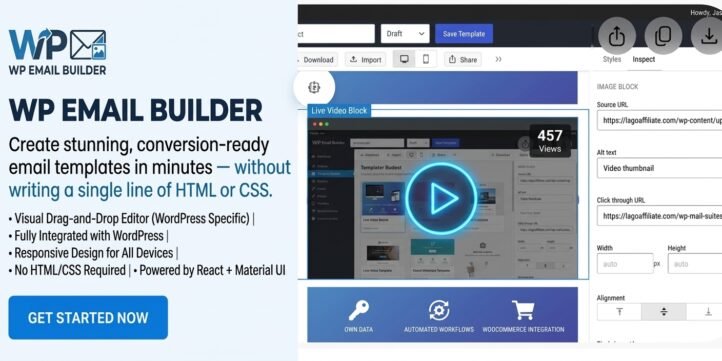
Professional Visual Email Template Builder for WordPress
Create stunning, conversion-ready email templates in minutes — without writing a single line of HTML or CSS. WP Email Builder is a full-featured, visual click-to-edit email design tool built specifically for WordPress. Powered by a modern React + Material UI interface and tightly integrated with your WordPress site, it gives marketers, store owners, agencies, and developers a fast, reliable way to design, manage, and export beautiful emails that look great on every device.
Whether you need welcome emails, order confirmations, password resets, promotional campaigns, newsletters, or transactional messages, WP Email Builder puts professional-grade design power directly inside your WordPress admin.
Why WP Email Builder?
Most email tools force you to leave WordPress, use external platforms, or struggle with outdated HTML editors. WP Email Builder eliminates that friction. Everything happens inside your familiar WordPress dashboard. You design visually, save templates as reusable assets, export clean HTML or JSON, and keep full control of your content and data.
The builder is based on the open-source Email Builder JS project and enhanced with a complete WordPress integration layer. The result is a production-ready plugin that feels modern, responsive, and reliable — while remaining lightweight enough for everyday use.
Visual Design That Feels Instant
Open the editor and you immediately see a clean, intuitive interface. On the left, a library of ready-to-use blocks. In the center, a live canvas that updates as you work. On the right, an inspector panel for fine-tuning every detail.
Available blocks include Text and Heading, Image, Button, Divider and Spacer, Columns and Container, Avatar, HTML block for custom code, and full Email Layout structure.
You can click the cross icon on the canvas, rearrange them, nest columns, and style everything visually. Global styles let you set consistent fonts, colors, spacing, and branding across an entire template so your emails stay on-brand without repetitive work.
A desktop / mobile preview toggle shows exactly how the email will appear on different screen sizes. Switch between Editor, Preview, JSON, and HTML tabs at any time to inspect the underlying structure or copy clean code for use in other systems.
Ready-Made Samples to Accelerate Your Work
Not every email needs to be built from scratch. WP Email Builder includes a samples drawer with professionally designed templates for common scenarios: Welcome email, OTP / verification code, Password reset, Reservation reminder, E-commerce receipt, Subscription receipt, Post metrics summary, and Respond to message.
These samples serve as excellent starting points. Load one, customize the content and branding, and you’re ready to send in minutes instead of hours.
Complete Template Management Inside WordPress
Templates are stored in your WordPress database, not on a third-party service. You get a clean list view with search by name or subject, Draft / Published status, and quick actions (Edit, Duplicate, Delete). One-click creation of new templates is supported.
Each template saves both the structured JSON document (so you can reopen and edit it later) and the rendered HTML (ready for export or use in other tools). This dual storage makes the plugin flexible for both visual designers and developers who need clean markup.
A full REST API is included for template CRUD operations, enabling advanced workflows, custom dashboards, or integration with other systems when needed.
Export Options That Fit Real Workflows
When your design is ready, you can download the template as JSON for backup or version control, copy or download the rendered HTML for use in any email service provider, or share / import JSON to move templates between sites.
Because the HTML is generated from a modern, standards-aware builder, it produces clean, email-client-friendly code that works reliably across major clients.
Built for Performance and Compatibility
WP Email Builder requires WordPress 6.0+ and PHP 7.4+. The frontend is a production Vite build — no Node.js is needed on your live site. Only compiled assets are shipped, keeping the plugin efficient and easy to maintain.
The interface is responsive and works well on larger screens where email design is typically done. Scripts are carefully enqueued, with the main builder loaded as an ES module and a bridge layer that handles WordPress-specific configuration and data exchange. License management is built in, allowing controlled activation across domains while keeping the core experience straightforward for authorized users.
Who Is It For?
Online store owners – Design branded order confirmations, shipping updates, abandoned-cart reminders, and promotional campaigns without leaving WordPress.
Marketers and content teams – Quickly produce consistent, on-brand emails and maintain a library of reusable templates.
Agencies and freelancers – Deliver professional email templates to clients faster, with the ability to duplicate and customize designs efficiently.
Developers – Use the visual builder for rapid prototyping, then export clean HTML or work with the JSON structure and REST API for deeper integration.
Membership and SaaS sites – Create polished transactional and lifecycle emails (welcome sequences, renewals, notifications) that match your product experience.
Key Benefits at a Glance
- Fully visual, no-code email design inside WordPress
- Modern React + MUI interface that feels fast and polished
- Desktop and mobile live preview
- Pre-built sample templates for common use cases
- Template library with search, status, duplicate, and delete
- JSON + HTML dual storage for flexibility
- Clean export options for any email platform
- REST API for advanced use cases
- Lightweight production build — no build step required on the live site
- Tight WordPress integration with proper capability checks and admin UX
A Better Way to Design Emails
Email remains one of the highest-ROI channels for communication and sales. Yet many teams still struggle with clunky editors, inconsistent branding, or the need to switch between multiple tools. WP Email Builder solves this by bringing a professional visual builder directly into WordPress.
You design once, save reusable templates, export clean code when needed, and keep everything under your control. The result is faster production, more consistent branding, and emails that look as good as the rest of your digital experience.
Whether you are sending your first branded newsletter or managing a library of transactional templates for a growing business, WP Email Builder gives you the tools to create professional results without the usual friction.
Seamless Integration with WP Mail Suites
WP Email Builder integrates with WP Mail Suites through the free plugin – Mail Suites Bridge (wpeb-mail-suits-bridge).
Create beautiful, responsive email templates with WP Email Builder’s intuitive visual click-to-edit editor. Then use the free Bridge plugin to transfer your templates to WP Mail Suites for campaign sending, advanced automation, subscriber management, WooCommerce-triggered sequences, segmentation, A/B testing, and reliable delivery through your preferred SMTP provider.
The workflow is simple:
Design with WP Email Builder → Connect with the Free Bridge → Send & Automate with WP Mail Suites
Keep your email templates, subscribers, and marketing data under your own WordPress installation — without third-party data lock-in
Together they form a complete, data-owned email marketing stack — design in WP Email Builder, automate and send with WP Mail Suites — without third-party data lock-in.
Start designing better emails today — right inside the WordPress admin you already use.
per year