Sell seats. Issue QR tickets. Check in at the door.
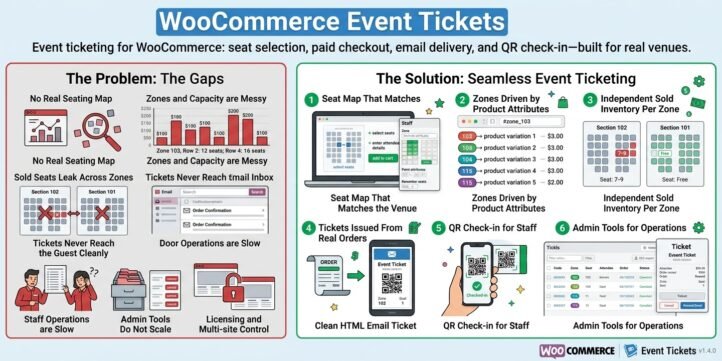
WooCommerce Event Tickets turns your WooCommerce store into a complete event ticketing system—from zone and seat selection to paid orders, branded email tickets with QR codes, and controlled door check-in. Built for venues, promoters, and online sellers who need more than a generic “event product,” it connects real seating logic to the checkout you already trust.
Whether you run a dome, a theater, a conference hall, or a multi-zone outdoor site, the plugin is designed around one idea: every ticket should know where it belongs, and every entry should be verifiable.
The problem most stores still face
Many WooCommerce “ticket” setups are little more than a product with a quantity. Customers buy “General Admission × 2,” and staff later struggle with paper lists, screenshot QR codes from third-party tools, or spreadsheets that never match the stage layout.
Real venues are more complex:
- Different zones (101, 102, upper tier, VIP) with different prices
- Irregular rows—front rows shorter than the back
- Mix of assigned seats and zone-only tickets
- Need for live remaining inventory on a visual map
- Door staff who must check tickets on a phone without giving the public the power to mark themselves “checked in”
WooCommerce Event Tickets addresses these gaps inside one plugin, on the same domain as your shop.
Two ways customers buy—one ticket system
1. Interactive grid seat map
Embed the shortcode on any page:
text
[wcet_seat_map product_id=”18533″]
Shoppers see a scrollable seat grid, pick seats by zone, enter attendee name and email, and check out through standard WooCommerce payment. Sold seats are locked and labeled so another buyer cannot take the same place.
Administrators (not the public) can open Edit zones to:
- Paint zones and aisles
- Resize rows and columns
- Renumber seats after closing empty cells so labels match the real hall
- Choose label styles such as 2-9 (numeric), B-9 (letter for row), or 2-J (letter for seat)
- Save independent layouts per zone (for example #zone_101 vs #zone_102)
On-screen stats show available / total seats for the loaded zone—useful for both staff and transparent selling.
2. Product page, zone-only
Not every sale needs a seat number. Customers can open the product, choose a Zone variation (for example Zone 102), fill attendee details, and pay. After the order reaches Processing or Completed, the system still issues a ticket and emails a QR card. The seat field may be empty; the zone is not. That flexibility fits standing areas, festival blocks, or early “zone hold” sales before a detailed map is final.
Both paths write into the same ticket database, so reporting and check-in stay consistent.
Stadium image map—see the venue, not only a grid
Version 1.5 merges the former Stadium Seat Map tools into Event Tickets. Under Event Tickets → Seat Map Editor, you upload a venue plan, draw zone polygons, and publish a front-end map:
text
[stadium_seat_map file=”seats.json” product_id=”18533″]
Hovering a zone shows live availability drawn from WooCommerce Event Tickets data—for example:
Zone 101 — 95 available / 96 total
Numbers come from the saved seat map capacity and non-cancelled tickets, not from static text in JSON. Zone IDs on the image map should match your product zone attributes (101, 102, …) so inventory stays aligned.
You no longer need a second plugin for the picture map and the ticketing engine.
Tickets, email, and QR—ready for the phone camera
When payment succeeds and the order moves to a fulfilled status, the plugin:
- Creates one ticket record per seat (or per zone-only line)
- Stores zone, seat label, attendee, order, and product
- Sends an HTML ticket email with event title, venue, entry/start time when set, zone, seat code, ticket code, and a QR code for the door
The email is built for scanning: staff open the link or use the check-in screen; the QR points at your site, not a random third-party host.
Ticket content stays practical. Seat codes appear as stored (for example 2-9 or B-9). Optional Chinese secondary lines such as “row / seat” phrasing can be omitted so international and bilingual shops keep a clean, English-first card.
Check-in that does not put the venue at risk
Public scanning is useful for viewing a ticket. Changing status to checked_in is not a public action.
Only logged-in users with the manage_woocommerce capability—typically Administrator or Shop manager—can confirm check-in, either from the ticket page after a scan or from Event Tickets → Ticket Check-in by typing or scanning the code into a field.
A practical door workflow:
- Staff log in on a phone via the WooCommerce My Account page
- Scan the attendee’s QR or enter the code
- Confirm check-in
- Status becomes checked_in on All Tickets
Guests who only open the QR link see ticket details; they cannot mark themselves entered. That separation is intentional for fraud reduction and clear audit trails.
Back office built for multiple events and products
Event Tickets → All Tickets is the operational list:
- Product column and product dropdown so tickets for product 18533 are not mixed with 18498
- Status filter (valid, checked_in, cancelled, and more)
- Search across code, name, email, zone, seat, and numeric product or order IDs
- Pagination for large catalogs
- Export CSV that respects the current filters—including product and status—so you do not accidentally download another event’s rows
- Single and bulk permanent delete with confirmation when seats must return to sale
Resend email and ticket detail views support day-of-show support without leaving WordPress.
Licensing and roles
A License submenu handles activation with token, domain, and email, including clear and reactivate flows and renewal-oriented messaging where configured. Capability checks keep map editing and check-in with store managers rather than every subscriber.
Edit zones on the grid map appears only for users who can manage the store or edit products. Ordinary buyers never see layout tools—only the grid and checkout fields.
Who it is for
- Arenas and stadiums with numbered zones and uneven rows
- Theaters and halls that sell by seat and need QR at the door
- Festivals and conferences that start with zone-only inventory and later refine maps
- WooCommerce merchants who already take payment online and refuse to bolt on an unrelated ticketing SaaS for basic seat logic
If your catalog is already on WooCommerce, Event Tickets extends it instead of replacing your cart, gateways, and customer accounts.
Why teams choose a merged, WooCommerce-native stack
Third-party ticketing often means another login, another fee schedule, and inventory that drifts from the store. A shortcode seat map that does not talk to orders creates double bookings. A QR that anyone can “approve” weakens the door.
This plugin keeps:
- One catalog (WooCommerce products and variations)
- One payment path (your existing gateways)
- One ticket table for grid seats, zone-only sales, and reports
- One admin menu—All Tickets, Ticket Check-in, Seat Map Editor, License
- Live remaining seats on both grid stats and stadium hover tooltips
From the first “Add to cart” to the last scan at the gate, the story stays on your domain.
Get started in outline
- Install WooCommerce Event Tickets (and remove any old standalone stadium-seat-map plugin).
- Activate the license.
- Create a variable product with a Zone attribute and priced variations.
- Optionally embed [wcet_seat_map product_id=”…”], edit zones as admin, renumber, and save.
- Optionally design the image map under Seat Map Editor and embed [stadium_seat_map … product_id=”…”].
- Place a test order; confirm the QR email.
- Log in as Shop manager; complete one check-in; confirm status checked_in.
- Filter All Tickets by product and export CSV for that event only.
Closing
WooCommerce Event Tickets is not a generic PDF generator glued to a product. It is a seat-aware, zone-aware, QR-ready ticketing layer for WooCommerce: maps for customers, tools for editors, lists and CSV for ops, and check-in reserved for trusted staff on a phone.
Sell the seat. Send the code. Scan at the door—without leaving the store you already run.
per year