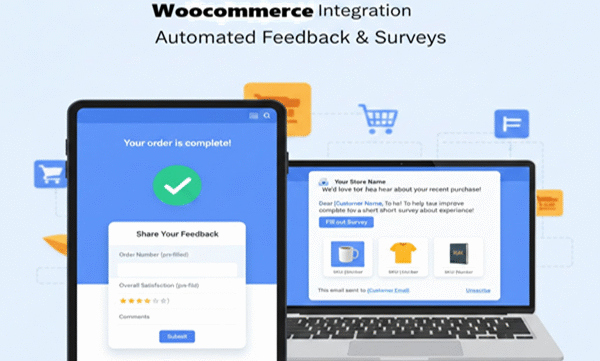
Overview
The WC Google Form Advanced plugin is a powerful and flexible WordPress plugin designed specifically for WooCommerce stores to seamlessly integrate Google Forms into your eCommerce workflow. It allows store owners to collect customer feedback, conduct surveys, or gather additional order-specific information in a user-friendly manner. This plugin combines two key functionalities: displaying a popup Google Form on the WooCommerce Thank You page and automatically sending Google Form links via email after a purchase, with full support for multiple SKUs and customizable email templates.
Key Features
- Popup Google Form on Thank You Page
- Display a Google Form as a popup immediately after a customer completes a purchase.
- Popup is only shown once per order per session, preventing repetitive interruptions.
- Supports multiple SKUs – different products can trigger different Google Forms.
- Easy to configure via the WordPress admin dashboard.
- Email Google Form Link After Purchase
- Automatically send a Google Form link to the customer’s email once their order is marked as “completed.”
- Works for specific SKUs, ensuring only relevant customers receive the form.
- Prevents duplicate emails for the same order and SKU.
- Supports dynamic placeholders for personalization, including
{first_name},{last_name},{sku},{order_id}, and{form_url}.
- Multiple SKU Support
- Assign different Google Forms to different product SKUs.
- Flexibly handle products with multiple variants or unique data collection needs.
- Customizable Email Templates
- Full control over the email subject and message.
- Use dynamic placeholders to personalize emails automatically.
- Editable via the plugin settings page – no code changes required.
- Easy Administration
- Simple and intuitive WordPress admin page for mapping SKUs to Google Form URLs.
- “Add More” button allows adding unlimited SKUs and associated forms.
- Checkbox options to choose whether each SKU triggers a popup, an email, or both.
- User-Friendly Frontend Experience
- Popup form is responsive and mobile-friendly.
- Customers can easily close the popup if they prefer to fill the form later.
- Email delivery ensures that customers can complete the form at their convenience.
Installation
- Upload the Plugin
- Download the
wc-google-form-advanced.zipfile. - Go to your WordPress dashboard → Plugins → Add New → Upload Plugin.
- Choose the plugin zip file and click “Install Now.”
- Download the
- Activate the Plugin
- After installation, click “Activate Plugin.”
- The plugin will now appear in the admin menu as Google Form Advanced.
- Verify WooCommerce
- Ensure WooCommerce is installed and activated.
- The plugin relies on WooCommerce hooks for order completion and Thank You page detection.
Configuration and Setup
Step 1: Access the Plugin Settings
- Go to WordPress Dashboard → Google Form Advanced.
- You will see a table to configure SKUs, Google Form URLs, and behavior options.
Step 2: Add SKUs and Google Forms
- Product SKU: Enter the exact SKU of the product you want to track.
- Google Form URL: Enter the full Google Form link that you want customers to access.
- Popup on Thank You Page: Check this box if you want the form to appear as a popup after checkout.
- Email Google Form Link: Check this box if you want to send the form link via email after purchase.
- Click Add More to add additional rows for more SKUs.
- Save changes to apply your configuration.
Step 3: Customize Email Templates
- Subject: Enter the email subject line. You can use the following placeholders:
{first_name}– Customer first name{last_name}– Customer last name{sku}– Product SKU{order_id}– WooCommerce order ID{form_url}– Google Form link
- Message: Enter the body of the email using the same placeholders. Example:
Hello {first_name} {last_name},

Thank you for purchasing SKU {sku}!

Please fill out the following Google Form to complete your order feedback:
{form_url}

Best regards,
Your Company
- Save the email template to apply changes.
How It Works
1. Popup on Thank You Page
- When a customer completes checkout and is redirected to the Thank You page, the plugin checks the purchased items.
- If the order contains SKUs mapped to Google Forms with the Popup option enabled:
- The corresponding Google Form is displayed as a popup.
- Only one popup is shown per session to avoid interruptions.
- Customers can close the popup and access the form later via the email link (if enabled).
2. Email Google Form Link
- When the order status changes to Completed in WooCommerce:
- The plugin checks all purchased SKUs with the Email option enabled.
- For each matching SKU, the plugin sends a personalized email using the saved template.
- Each SKU will only trigger one email per order, preventing duplicates.
- Email placeholders are dynamically replaced with customer and order data.
- Customers receive a clean and personalized link to the Google Form.
Best Practices
- Use unique Google Form URLs per SKU
- This ensures that responses are organized and specific to each product.
- Test the Email Template
- Send a test order to ensure that placeholders like
{first_name}and{form_url}are correctly replaced.
- Send a test order to ensure that placeholders like
- Limit the number of popups per order
- If a single order has multiple SKUs triggering popups, consider using the email option for additional forms to avoid overwhelming the customer.
- Monitor Email Deliverability
- Ensure your WordPress site is configured to send emails reliably. Use SMTP plugins if necessary.
- Track Form Responses
- Monitor responses in Google Forms or Google Sheets to analyze customer feedback.
Advanced Features
- Multiple SKUs
- Each SKU can have its own Google Form, popup/email behavior, and email template placeholders.
- Session-Based Popup Control
- Popups are session-controlled to prevent repeated display on page refresh.
- Order Meta Email Control
- The plugin stores a flag in the order meta to ensure emails are only sent once per SKU per order.
- Responsive Popup Design
- The popup is fully responsive and adapts to desktop and mobile devices.
- Dynamic Variables
- Automatically populate Google Forms or email templates with order-specific information for personalized communication.
Use Cases
- Customer Feedback Collection
- After completing a purchase, collect product feedback directly via Google Forms.
- Post-Purchase Surveys
- Automatically send a satisfaction survey to customers who purchased specific SKUs.
- Promotional Form or Sweepstakes Entry
- Give customers access to special promotions or sweepstakes by completing a Google Form after checkout.
- Product Registration
- For products requiring registration (e.g., electronics, warranties), send a Google Form link via email.
- Multi-SKU Orders
- Handle orders with multiple products, each triggering a different form or communication method.
Technical Details
- Developed for WordPress 6.x and WooCommerce 7.x.
- Uses WooCommerce hooks:
woocommerce_order_status_completed→ trigger email after order completionis_wc_endpoint_url('order-received')→ detect Thank You page for popup
- Stores SKU-to-Form mappings in
wp_optionsas serialized arrays. - Emails are sent using WordPress
wp_mail()function, with meta storage preventing duplicate sends. - Frontend popup is handled with HTML/CSS/JS and session storage for single-session display.
Summary
The WC Google Form Advanced plugin provides a comprehensive solution for WooCommerce stores to collect valuable customer feedback, manage post-purchase surveys, and engage customers effectively. By integrating Google Forms directly into your store workflow, store owners can automate the collection of responses based on specific SKUs and provide a seamless user experience.
With its dual popup and email system, dynamic placeholders, multi-SKU support, and fully editable templates, this plugin ensures you can gather the right information from the right customers, at the right time – without disrupting the checkout experience.
Whether you want a Thank You page popup, an email follow-up, or both, this plugin provides the flexibility, customization, and reliability needed to optimize customer engagement and collect actionable insights after each purchase.
per year A quick note about the reviews on this site: I am an affiliate marketer, reviewing some vendor’s products. The venders of these products gave me free of charge for me to test them. However, all my reviews are done as honestly as possible and I am not making any commitment to the vendor before doing my reviews. If you click on the link on this website to take you to the paid product, this link will be an affiliate link and I will be paid a percentage of the sales price should you decide to purchase that product.