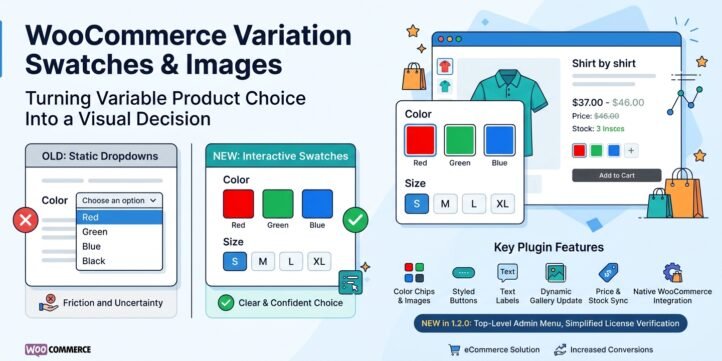
WooCommerce Variation Swatches & Images
Product Description
Turning Variable Product Choice Into a Visual Decision
Online shoppers do not buy color and size the way they once did in a physical store. On a product page they cannot touch fabric, hold a sample next to the light, or ask a clerk which option is left in stock. What they see is usually a plain HTML select box: a list of text labels that forces them to open a menu, read every line, and hope the wording matches the photo above. That friction is not cosmetic. It is a conversion problem.
WooCommerce Variation Swatches & Images exists to close that gap. The plugin replaces default variation dropdowns on variable products with clear, clickable swatches—color chips, product images, text labels, or styled buttons—while staying fully compatible with WooCommerce’s native variation engine for price, stock, gallery updates, and add-to-cart. Version 1.2.0 builds on that foundation with a dedicated top-level admin menu and a complete license verification flow so store owners can manage settings and licensing in one place.
The Problem: Dropdowns Hide the Decision
Variable products are the backbone of fashion, cosmetics, furniture, and many catalog businesses. A single parent product can represent dozens of combinations of color, size, finish, or pack size. WooCommerce handles that data model well: attributes, terms, and variations with their own SKUs, prices, and images. The default presentation does not.
A select list compresses every option into identical text. Color names such as “Midnight Navy” and “Ocean Blue” look the same until the customer already knows the brand’s palette. Image-driven attributes—fabric patterns, print designs, or packaging styles—lose their meaning when reduced to a string. Mobile users face an even harder task: opening a native picker, scrolling a long list, and dismissing it after each attempt. Every extra tap is a chance to abandon the page.
Merchants also struggle with operational clarity. Out-of-stock options may still appear as selectable text until the customer hits an error. Teams that import catalogs from suppliers often already have a photo on every variation but no easy way to surface that photo as a chooser. Theme and plugin conflicts make some “swatch” solutions fragile: they override templates, break when WooCommerce updates, or require developers to patch core files.
The result is familiar: lower conversion on variable products, higher support tickets about “wrong color ordered,” and catalog managers who avoid complex attributes because the frontend cannot explain them.
The Solution: Swatches That Respect WooCommerce
This plugin does not reinvent variation logic. It improves the interface. The native select can remain in the page (optionally hidden) so WooCommerce’s JavaScript continues to drive availability, pricing, and the add-to-cart button. Swatches simply give shoppers a faster, more visual way to set the same values.
Four swatch types cover the main catalog patterns:
- Color — circular chips driven by a hex value on each attribute term. Ideal for paints, apparel dyes, and solid finishes.
- Image — media-library images attached to terms. Ideal for patterns, packaging, and any attribute that should look like the real product.
- Label — compact text treatments when a short name is enough.
- Button — larger, more prominent controls for size or configuration choices that benefit from a button look.
Configuration lives where store managers already work. Global defaults live under a top-level admin menu named Variation Swatches, with a Settings screen for enable/disable, tooltip and label visibility, dimensions, border radius, gap, border width, out-of-stock behavior, and an optional automatic variation-image mode. Fine control sits on each attribute term under Products → Attributes: choose type, color, image, and related fields when editing Color, Size, or any custom taxonomy that begins with the standard product-attribute prefix.
Because term images take priority, catalog teams can set brand-accurate chips once and let them apply across every product that uses those terms. When manual images are missing, the optional automatic mode can pull the first matching variation’s featured image into the swatch—especially useful after bulk imports where each SKU already has a photo but term meta was never filled.
Out-of-stock behavior is explicit. Merchants choose to disable selection, hide unavailable options, or disable and cross them out. That choice is global and works with WooCommerce’s live availability as the customer builds a combination.
No core files are modified. No theme templates are required for standard variable product pages. CSS and JavaScript load from the plugin’s assets folder and adapt to responsive layouts so swatches remain usable on phones and desktops.
Admin Experience in v1.2.0
Version 1.2.0 promotes the plugin from a WooCommerce submenu into its own top-level menu. Under Variation Swatches you will find Settings and License. Plugin list quick links point to both. That structure matches how many commercial WooCommerce extensions are operated and keeps licensing visible without burying it under another plugin’s settings.
License verification is built for remote activation against the LagoMart store API. Administrators enter a license token (purchase code), the site domain, and an email address. The plugin signs requests with HMAC, registers the domain, stores a private key returned by the API, and marks the install as verified. Subsequent checks use short-lived transients and a soft offline grace period so temporary network issues do not lock out a legitimate site immediately after activation.
Protected admin pages (Settings and related slugs) redirect unlicensed users to the License screen. Notices appear on relevant admin screens until activation succeeds. When a license is near expiry, the License page surfaces remaining days, a renewal checkout path, and a one-click renew action after payment. A full reset control clears local license data so a site can be re-registered cleanly.
These controls protect commercial value without blocking the public product experience beyond what you configure. Store owners retain a clear path: install, activate license, set global appearance, style attribute terms, and let variable products sell themselves more clearly.
Who It Is For
The plugin is aimed at merchants and agencies who sell variable products and care about clarity on the product page: fashion and apparel brands that need accurate color representation; beauty and cosmetics catalogs with many shades; home and furniture sellers with finishes and fabrics; and any store that imports rich variation images and wants those images to drive selection instead of sitting only in the gallery.
It is also for operators who want a predictable admin surface—one menu, one settings screen, one license flow—rather than another nested option buried under WooCommerce → Settings.
What You Get in Practice
After activation, a shopper on a variable product sees swatches instead of (or in addition to) a hidden select. Choosing a color updates the variation state the same way a dropdown would: price, stock message, and product image respond through WooCommerce. Choosing a size that is out of stock follows your global rule—disabled, hidden, or crossed out. On mobile, tapping a chip is faster than opening a long picker. On desktop, tooltips and labels reduce ambiguity between similar names.
Behind the scenes, attribute terms carry structured meta for type and media. Global options live in a single WordPress option. License state uses dedicated options and transients with remote verification against the store API. Uninstall can preserve settings for easy reinstall; a full clean removal is possible by deleting the relevant options and term meta if required.
Technical Fit
Requirements are conservative: WordPress 5.8+, PHP 7.4+, WooCommerce 5.0+. The plugin declares dependency on WooCommerce and shows an admin notice if it is missing. Text domain and strings are prepared for translation. The design goal remains compatibility first: enhance the UI, leave the variation engine alone, and avoid theme coupling.
Summary
Dropdown-only variable products ask customers to imagine differences they cannot see. WooCommerce Variation Swatches & Images turns those differences into color, image, label, and button choices that map directly to WooCommerce variations. Global settings and per-term configuration give catalog teams control; out-of-stock modes and optional automatic image mapping reduce edge cases; and version 1.2.0’s top-level menu plus license system make administration and commercial protection straightforward.
The pain is invisible choice and slow selection. The solution is visual selection that stays honest to stock and price—without rewriting how WooCommerce already works.