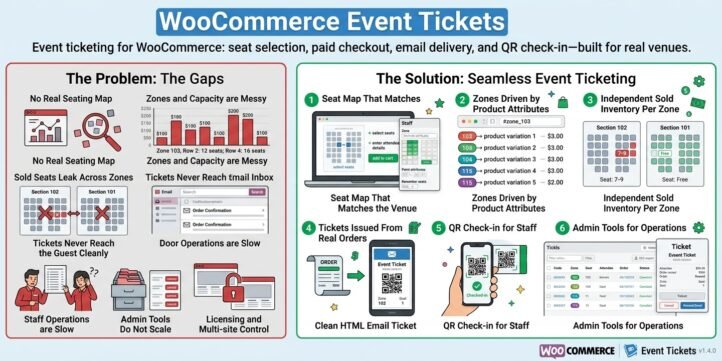
Event ticketing for WooCommerce: seat selection, paid checkout, email delivery, and QR check-in—built for real venues.
The problem
Most WooCommerce stores sell products, not seats. When organizers try to run concerts, conferences, sports, or theater on a standard shop, the gaps show up quickly:
- No real seating map — Customers cannot pick a section and a seat. Staff end up managing Excel sheets or third-party tools that do not talk to WooCommerce orders.
- Zones and capacity are messy — Different sections have different prices and different row widths (front rows shorter, back rows wider). Generic “variable products” cannot express “Zone 103, row 2 has 12 seats; row 4 has 16.”
- Sold seats leak across zones — If “7-9” is sold in section 102, section 101 must still allow “7-9.” Systems that only key off a seat number block the wrong inventory.
- Tickets never reach the guest cleanly — After payment, attendees need a clear ticket: event name, venue, entry time, zone, seat, and a scannable QR—not a generic order email.
- Door operations are slow — Without a dedicated check-in flow, staff hunt order numbers instead of scanning a code in seconds.
- Admin tools do not scale — Large events need filtered lists, pagination, CSV export, and safe permanent delete—not only “cancel.”
- Licensing and multi-site control — Agencies and product vendors need activation tied to domain, with clear status and renewal—not an unlocked free-for-all on every copy of the plugin.
WooCommerce Event Tickets v1.4.0 is built to close these gaps inside the store you already run.
The solution
The plugin turns a variable WooCommerce product into an event ticket product, then connects a front-end seat map, per-zone inventory, order-driven ticket issuance, HTML email tickets with QR, and admin check-in—with optional license activation for distribution.
1. Seat map that matches the venue
Editors place a shortcode on any page:
text
[wcet_seat_map product_id=”18533″]
Shoppers see a scrollable grid (independent horizontal and vertical scroll), select seats, enter attendee name and email, and add those seats to the cart for normal WooCommerce checkout.
In Edit zones mode, staff can:
- Set grid size (rows × columns)
- Paint zones from the product’s attributes (dynamic: however many zones the product defines)
- Mark aisles / closed cells where seats do not exist
- Renumber seats per row so remaining seats become 1-1, 1-2… after side seats are closed
- Shift+click a seat to edit its display label manually
- Save map to product meta so the layout persists
Irregular rows are supported: row 2 with 12 seats, row 3 with 14, last two rows with 12 each—by closing side cells as aisle and renumbering.
2. Zones driven by product attributes
Zone brushes are not hard-coded. They come from the product’s Zone attribute / variations—for example:
text
103 | 104 | 115 | 214 | 215 | 401 | 501
or
Zone 103 |Zone 104 |Zone 115 |Zone 214 |Zone 215 |Zone 401 |Zone 501
or venue-specific names. Different events and venues can use different counts and names. Checkout maps each selected seat to the matching variation price.
Optional URL hashes such as #zone_103 or #103 isolate a zone view for layout work and sold-seat display.
3. Independent sold inventory per zone
A seat is considered sold only when product + seat label + zone all match. Buying 7-9 in zone 102 does not block 7-9 in zone 101. That matches real stadiums and multi-section halls.
4. Tickets issued from real orders
When an order is paid and moves into processing/completed (as configured with your order flow), the plugin creates ticket records: code, zone, seat, attendee, order link, status. Guests receive an email ticket card with event, venue, entry time, zone, seat, ticket code, and QR for door entry.
5. QR check-in for staff
Event Tickets → Ticket Check-in accepts typed codes or scanner input. Staff see attendee details, zone, and seat before confirming check-in. Duplicate scans and cancelled tickets are rejected with clear messages.
6. Admin tools for operations
Under a dedicated top-level Event Tickets menu:
- All Tickets — search, status filter, pagination, zone/seat columns, CSV export of the current filter, single and bulk permanent delete (with confirmation), plus cancel and resend email on the detail screen
- Ticket Check-in — door workflow
- License — token, domain, email activation; clear and reactivate; status; expiry and renew prompts
7. License verification
For paid distribution, the plugin talks to your licensing API (HMAC-signed register/verify). Unlicensed sites are redirected from All Tickets and Check-in to the License screen. Offline grace and domain limits follow the same pattern as your other LagoMart products.
Who it is for
- Venues and promoters selling section-based seats on WooCommerce
- Agencies building multi-event stores with different zone layouts per product
- Organizers who need QR door entry without a second SaaS
- Product sellers who require license activation per domain
What you still use from WooCommerce
Payments, taxes, coupons, order statuses, emails infrastructure, and customer accounts stay in WooCommerce. Event Tickets adds the seating, ticket, and check-in layer on top—so you do not abandon the cart and checkout you already trust.
Summary
Pain: WooCommerce does not natively sell seats by zone with irregular rows, independent section inventory, QR tickets, and door check-in.
Solution: WooCommerce Event Tickets v1.4.0 adds a product-driven seat map, zone-aware inventory, order-based ticket issuance, email + QR, admin export/delete, and optional license control—so one store can run serious events from browse to door.