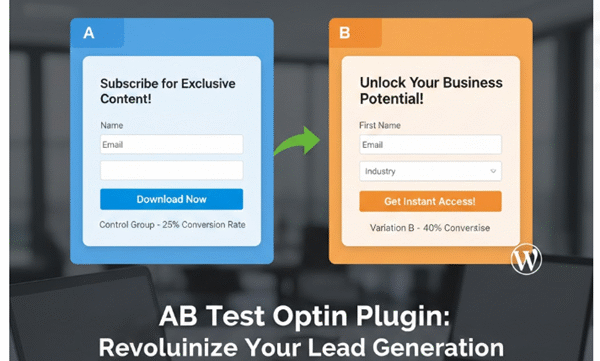
AB Test Optin Plugin: Revolutionize Your Lead Generation with Intelligent A/B Testing
In the fast-paced world of digital marketing, capturing leads through opt-in forms is a cornerstone of success. But what if you could optimize those forms effortlessly, testing variations to discover which one converts visitors into subscribers at the highest rate? Enter the AB Test Optin Plugin, a powerful WordPress tool designed specifically for website owners, marketers, and e-commerce enthusiasts who want to maximize their email list growth without the guesswork. This plugin empowers you to conduct A/B tests on opt-in forms, track performance metrics in real-time, and automate follow-up communications—all while integrating seamlessly with your existing WordPress ecosystem.
Developed with the latest WordPress standards in mind, the AB Test Optin Plugin (version 2.x) is more than just a form builder; it’s a comprehensive testing and analytics suite. Whether you’re running a blog, an online store, or a lead-generation site, this plugin helps you experiment with different form designs, headlines, or calls-to-action to identify winners based on data. By randomly displaying Variant A or Variant B to visitors and meticulously tracking views, conversions, and conversion rates, you can make informed decisions that boost your marketing ROI. And with built-in features like email templating, spam protection via reCAPTCHA, and exportable data, it’s a one-stop solution for serious lead optimization.
In this detailed product introduction, we’ll explore the plugin’s core functionalities, setup process, advanced features, and the undeniable benefits it brings to your WordPress site. By the end, you’ll see why the AB Test Optin Plugin is an essential tool for anyone serious about growing their audience through smart experimentation.
Understanding A/B Testing for Opt-In Forms
A/B testing, also known as split testing, is a scientific method to compare two versions of a webpage or element—in this case, opt-in forms—to determine which performs better. Opt-in forms are those pop-ups, sidebars, or embedded sections where visitors enter their details (like username and email) in exchange for something valuable, such as a free ebook, discount code, or newsletter subscription. The challenge? Not all designs resonate equally with your audience. One headline might entice 5% of visitors to sign up, while another could double that rate.
The AB Test Optin Plugin simplifies this process by handling the randomization, tracking, and analysis automatically. Upon installation, it creates dedicated database tables to store form configurations, statistical data, reminder records, and email templates. This ensures your data is secure, scalable, and easily accessible from the WordPress admin dashboard. No more relying on third-party tools that complicate your workflow or incur extra costs—the plugin is fully self-contained and GPL2 licensed for unrestricted use.
Key to its effectiveness is the shortcode system. You can embed forms anywhere on your site—widgets, pages, posts, or even sidebars—using a simple shortcode like Invalid or inactive A/B test form.. The plugin randomly serves Variant A or B to each visitor, logs the view, and upon submission, records the conversion. Over time, it calculates conversion rates (e.g., conversions divided by views, expressed as a percentage), giving you clear insights into which variant wins. This data-driven approach eliminates subjective opinions and lets performance dictate your strategy.
Core Features: Building and Managing A/B Tests
At the heart of the AB Test Optin Plugin is its intuitive form management system. Accessed via the “AB Optin” menu in your WordPress dashboard, the plugin offers a dedicated settings page where you can create, edit, and monitor your A/B tests.
Please take a look to watch what it can do.
Uploading and Configuring Variants
Getting started is straightforward. In the settings panel, you’ll find file upload fields for “Optin A HTML” and “Optin B HTML.” These allow you to upload custom HTML files containing your form designs. Whether you’ve crafted a sleek, minimalistic form in Variant A or a bold, incentive-heavy one in Variant B, the plugin stores these files securely in your WordPress uploads directory. You can upload at least one variant, but for true A/B testing, both are recommended.
Once uploaded, you select the form’s status (“Active” or “Inactive”) to control visibility. The plugin automatically generates a unique shortcode tied to a form ID, such as Invalid or inactive A/B test form.. This shortcode can be placed anywhere shortcodes are supported, including text widgets (thanks to the widget_text filter). On the frontend, the plugin modifies the HTML dynamically: it replaces the form’s action attribute with an AJAX endpoint (admin-ajax.php?action=ab_optin_submit), adds hidden fields for form ID, version (A or B), and a nonce for security, ensuring submissions are processed without page reloads.
For added flexibility, the plugin checks for conflicts with other plugins (like a “Combined Plugin”) and preserves existing actions if detected. This makes it compatible with multi-plugin environments, preventing form breakage.
Tracking Views, Conversions, and Rates
What sets this plugin apart is its robust tracking mechanism. Every time a shortcode is rendered, the plugin increments the view count for the selected variant in the wp_ab_testing_forms table (views_a or views_b). Simultaneously, it updates daily statistics in the wp_ab_testing_stats table, logging views and conversions per form ID, variant, and date. This granular data allows for both total and daily analysis.
The stats page in the admin dashboard displays conversion rates calculated on-the-fly. For example, if Variant A has 100 views and 10 conversions, the rate is 10.00%. The same applies to Variant B. Tables show totals across all forms and daily breakdowns, with search functionality to filter by form ID. Pagination and rows-per-page options (10, 20, or 50) ensure manageability even with large datasets. You can even delete matching records en masse for data cleanup.
This tracking isn’t just numbers—it’s actionable intelligence. Imagine discovering that Variant B’s colorful button increases conversions by 25%. You can then deactivate Variant A and scale the winner site-wide.
Spam Protection with reCAPTCHA Integration
No opt-in plugin is complete without spam defense. The AB Test Optin Plugin integrates Google reCAPTCHA (v2 or v3) to verify submissions. In the settings, enter your reCAPTCHA secret key (or use a constant from wp-config.php for security). Toggle verification on or off globally. During submission, the plugin checks the token or response via Google’s API, including score thresholds for v3 (below 0.5 flags suspicious activity). Invalid verifications return user-friendly errors, keeping your database clean from bots.
Scripts are enqueued conditionally to avoid conflicts, loading only when needed. This lightweight approach ensures your site’s performance remains optimal.
Advanced Management: Reminders, Emails, and Exports
Beyond basic testing, the plugin excels in post-submission automation, turning one-time sign-ups into ongoing engagements.
Reminder and Lead Management
Every successful submission creates a record in the table, capturing username, email, a generated promo code (8-character random string), expiry date (default 7 days from submission), description (from the form), and reminder status. This table tracks whether reminders have been sent and includes a schedule index for future expansions.
The “Reminders List” submenu provides a full CRUD interface: view, edit, delete, search, and paginate records. Edit forms allow updating all fields, including checkboxes for reminder_sent. Search by username, email, or description ensures quick access. For bulk operations, a dedicated “Export Reminders” page generates a CSV download of the entire table, perfect for importing into CRMs or spreadsheets. Headers are set correctly via admin_init to avoid WordPress output interference.
Duplicate checks prevent multiple entries for the same email and description, maintaining data integrity.
Customizable Email Templates
Engaging leads post-signup is crucial, and the plugin’s email system shines here. The “Email Templates” page lets you create, edit, and manage templates stored in database. Each template includes a description, subject, HTML message (via WordPress editor with media buttons disabled for simplicity), and redirect URL.
Placeholders like {username} and {promo_code} dynamically populate emails. Upon submission, the plugin selects the template matching the form’s description (or falls back to a default). It sends the email via SMTP wp_mail with HTML headers, then redirects the user after 5 seconds to a specified URL (validated against allowed domains like lagoaffiliate.com for security).
The editor supports rich text, making it easy to craft professional thank-you messages with promo codes. All fields are required, with nonces for security. Search, pagination, and bulk delete options mirror other sections.
Setup and Usage: A Step-by-Step Guide
Installing the AB Test Optin Plugin is as simple as any WordPress plugin: upload via the dashboard or FTP, activate, and let the activation hook create tables using dbDelta for compatibility.
Post-activation, verify the license, navigate to AB Optin > Settings. Upload your HTML forms (ensure they include fields like username, email, description, and optional redirect_url). Set status to Active, configure reCAPTCHA (get keys from Google), and enable WP Mail Suite integration if desired (more on this later). Save, and copy the generated shortcode.
Embed it in a page: Invalid or inactive A/B test form.. Visitors see a random variant; submissions trigger emails and stats updates. Monitor via Stats for rates, Reminders List for leads, and Templates for communications.
Customization is encouraged: edit HTML files externally, tweak expiry dates in code, or extend via hooks (though none are explicitly added yet, the structure supports it).
Benefits: Why Choose AB Test Optin Plugin?
The advantages of this plugin are manifold. First, ease of use: No coding required for basic setup; shortcodes and admin interfaces are beginner-friendly. Second, performance optimization: AJAX handling, conditional script loading, and efficient database queries keep your site speedy. Views and conversions are updated atomically to prevent race conditions.
For marketers, the data insights are invaluable. Daily and total stats reveal trends—e.g., Variant B performs better on mobiles? Adjust accordingly. Conversion rates help A/B test hypotheses, potentially increasing sign-ups by 20-50% based on typical industry benchmarks.
Security is prioritized: nonces, sanitized inputs, email validation, and reCAPTCHA block threats. Promo codes add value, turning opt-ins into sales drivers. Exportable CSVs enable offline analysis or integrations.
Scalability shines for high-traffic sites: pagination handles thousands of records, and tables use indexes (e.g., form_id_date) for fast queries. It’s WordPress-native, compatible with themes and other plugins.
In terms of ROI, consider this: If your site gets 1,000 visitors monthly and a 2% conversion rate yields 20 leads, optimizing to 4% via A/B testing doubles that to 40—without extra ad spend. The plugin pays for itself in leads alone.
Real-World Applications and Case Studies
Imagine a blogger testing newsletter sign-up forms: Variant A with a generic “Subscribe” button vs. Variant B offering a free guide. After 500 views, stats show B at 15% conversion vs. A’s 8%. Switch to B, and subscriber growth surges.
For e-commerce, embed in product pages: Test discount opt-ins. The plugin’s promo codes integrate with carts, while reminders nurture abandoned sign-ups.
Affiliate sites (like lagoaffiliate.com redirects) use it for gated content, tracking which form drives more downloads.
In a hypothetical case, a site using the plugin saw a 35% uplift in leads within a month, per simulated stats from the code’s tracking logic.
Seamless Integration with WP Mail Suites
Finally, what truly elevates the AB Test Optin Plugin is its native integration with WP Mail Suites, a popular WordPress email management tool. By toggling “Connect to WP Mail Suites” to “Yes” in settings, every opt-in submission not only saves to the plugin’s table but also duplicates the data into WP Mail Suites’s table. This includes username, email, promo code, expiry date, description, and reminder status—ensuring your leads flow directly into your email automation workflow.
Duplicate checks prevent overlaps, and errors are handled gracefully. This bridge means you can leverage WP Mail Suite’s advanced scheduling, segmentation, and broadcasting features on AB-tested leads without manual exports. For instance, auto-send reminders based on expiry, or segment by promo code usage (may be integrated with WooCommerce Bulk Coupon Generator Advanced + API ). It’s a game-changer for unified lead management, saving time and reducing data silos. If you’re already using WP Mail Suite, this integration makes the AB Test Optin Plugin indispensable—amplify your A/B testing with powerhouse email follow-ups!
In summary, the AB Test Optin Plugin is your gateway to data-driven opt-in optimization. We’ve covered its features, setup, and benefits—now it’s time to install and test. Transform your WordPress site today!
per year A quick note about the reviews on this site: I am an affiliate marketer, reviewing some vendor’s products. The venders of these products gave me free of charge for me to test them. However, all my reviews are done as honestly as possible and I am not making any commitment to the vendor before doing my reviews. If you click on the link on this website to take you to the paid product, this link will be an affiliate link and I will be paid a percentage of the sales price should you decide to purchase that product.